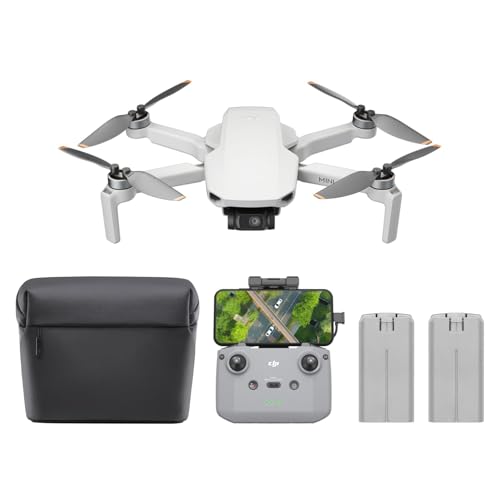
Having trouble with your DJI Mini 2 battery not charging? Look no further! In this article, I will guide you through the troubleshooting process to help you resolve this issue. As drones continue to rise in popularity, it’s important to understand how to overcome common problems that may arise, such as battery charging difficulties. I will provide you with well-researched information, useful tips, and examples to help you identify and resolve this issue. So, let’s dive in and get your DJI Mini 2 back up in the air!
Troubleshooting the DJI Mini 2 Battery Not Charging Issue
Introduction
If you own a DJI Mini 2 drone and are experiencing difficulties with the battery not charging, you’re not alone. This common issue can be frustrating, but fortunately, there are several troubleshooting steps you can take to resolve the problem. In this article, I will guide you through the possible causes of the battery not charging, as well as the steps you can take to troubleshoot and potentially fix the issue.
Prime for Young Adults — 6 Months Free
Exclusive Offer Amazon Prime for Young Adults, Students and 18–24s get six months of Prime free, then half price.
Start 6 Months Free As an Amazon Associate I earn from qualifying purchases.Background
The DJI Mini 2 is a popular drone known for its compact size and impressive features. However, like any electronic device, it can encounter issues from time to time. One such issue is the battery not charging properly or at all. Understanding the common causes of this problem and the troubleshooting steps can help you get back in the air with your Mini 2.
Main Points
I. Common Causes of DJI Mini 2 Battery Not Charging
When you encounter the issue of the DJI Mini 2 battery not charging, there are several common causes that you should consider:
A. Faulty Charging Cable
One of the most common causes of a battery not charging is a faulty charging cable. Over time, cables can become damaged or frayed, resulting in a poor connection between the charger and the battery. Inspect your charging cable for any visible signs of wear and tear, such as exposed wires or bent connectors. If you notice any damage, try using a different charging cable to see if the issue persists.
B. Battery Overheating
If the battery of your DJI Mini 2 gets too hot, it may refuse to charge as a safety measure. Overheating can occur if you have been flying the drone for an extended period or if it has been exposed to direct sunlight for too long. Allow the battery to cool down fully before attempting to charge it again.
C. Software Issues
Software glitches can also cause problems with the battery charging process. Ensure that both the drone’s firmware and the DJI Fly app are up to date. Manufacturers often release software updates that address known issues, including battery charging problems. Connect your Mini 2 to a stable internet connection, open the DJI Fly app, and check for any available updates.
D. Battery Compatibility
Using incompatible batteries or charging equipment can also result in the battery not charging. Make sure you are using the correct battery model for your DJI Mini 2. Using third-party or off-brand batteries may cause compatibility issues and could potentially damage your drone or battery.
II. Troubleshooting Steps for DJI Mini 2 Battery Not Charging
If you find that your DJI Mini 2 battery is not charging, try the following troubleshooting steps before considering more advanced options:
Prime for Young Adults — 6 Months Free
Exclusive Offer Amazon Prime for Young Adults, Students and 18–24s get six months of Prime free, then half price.
Start 6 Months Free As an Amazon Associate I earn from qualifying purchases.A. Check Charging Cable and Connectors
Start by carefully inspecting the charging cable and connectors for any signs of damage. Ensure that the cable is securely connected to both the charger and the battery. If you have another compatible charging cable, try using it to determine if the issue lies with the cable itself.
B. Check Battery Temperature
Before attempting to charge the battery, make sure it is at an appropriate temperature. If the battery is too hot or too cold, it may not charge properly. Allow the battery to reach room temperature before attempting to charge it.
C. Update Firmware and Software
Outdated firmware or software can cause various issues, including battery charging problems. Connect your DJI Mini 2 to the DJI Fly app and check for any available updates. Follow the instructions provided by the app to update both the drone’s firmware and the app itself.
D. Ensure Battery Compatibility
Confirm that you are using the correct battery model for your DJI Mini 2. Using non-compatible batteries can lead to charging issues. Check the DJI official website or consult your drone’s manual to ensure you have the right battery.
III. Advanced Troubleshooting for DJI Mini 2 Battery Not Charging
If the basic troubleshooting steps do not resolve the battery charging issue, you can try the following advanced troubleshooting methods:
A. Reset Battery
Resetting the battery can sometimes resolve charging issues. To reset the battery, disconnect it from the drone and remove it from the charger. Then, press and hold the power button on the battery for approximately 10 seconds. Reconnect the battery to the charger and try charging it again.
B. Calibrate Battery
Battery calibration can help recalibrate the charging circuitry and potentially resolve charging problems. To calibrate the battery, fully charge it, then completely drain it until the drone shuts down. Repeat this process twice to ensure accurate calibration. After calibrating the battery, try charging it again.
Prime for Young Adults — 6 Months Free
Exclusive Offer Amazon Prime for Young Adults, Students and 18–24s get six months of Prime free, then half price.
Start 6 Months Free As an Amazon Associate I earn from qualifying purchases.C. Contact DJI Support
If you have tried all the troubleshooting steps and the DJI Mini 2 battery still doesn’t charge, it may be time to contact DJI support. They can provide you with further assistance and guide you through additional troubleshooting steps or potentially arrange a repair or replacement if necessary.
Examples
To illustrate the troubleshooting steps, let’s consider a scenario where a DJI Mini 2 owner notices that their battery is not charging. They inspect the charging cable and find a frayed wire, indicating a faulty cable. After replacing the cable, they attempt to charge the battery again and find that it charges successfully.
Visual Aids
Incorporating visual aids such as images or diagrams can be helpful in understanding the troubleshooting steps and identifying potential issues. For example, including an image highlighting the connectors on the DJI Mini 2 battery and charger can assist readers in locating and inspecting the connections.
Conclusion
Experiencing a DJI Mini 2 battery not charging issue can be a frustrating roadblock to your drone flying adventures, but with the right troubleshooting steps, you can often resolve the problem. By checking the charging cable, ensuring battery compatibility, updating firmware and software, and taking advantage of advanced troubleshooting methods, you can improve the chances of successfully charging your Mini 2 battery.
FAQs
I. What are the basics one should know about this topic? Understanding the common causes of a DJI Mini 2 battery not charging and the troubleshooting steps can help you resolve the issue efficiently.
II. Are there any common misconceptions related to this topic? One common misconception is that any charging cable will work with the DJI Mini 2. However, it is crucial to use the correct cable and ensure compatibility with the battery and charger.
III. How is this topic relevant to the current drone industry? Battery charging issues are a common problem faced by drone owners, including those who own DJI Mini 2 drones. Understanding how to troubleshoot and fix these issues can help drone enthusiasts continue using their devices without interruptions.
IV. What are the future prospects or developments expected in this area? As technology advances, we can expect improvements in battery charging efficiency for drones, including the DJI Mini 2. Manufacturers are continually working on optimizing battery performance and addressing charging-related issues.
V. How can someone get involved or learn more about this topic? To learn more about troubleshooting battery charging issues for the DJI Mini 2 and other drones, you can explore online forums, join drone enthusiast communities, or refer to the official DJI support resources.
Call to Action
If you’re facing a DJI Mini 2 battery not charging issue, don’t give up just yet. Follow the troubleshooting steps outlined in this article and get back to enjoying the skies with your drone. Remember to always prioritize safety and consult DJI support if you require additional assistance. Keep exploring the world of drones and unleash your creativity from above!