How to Register Your Drone with the FAA: Official 2024 Guide
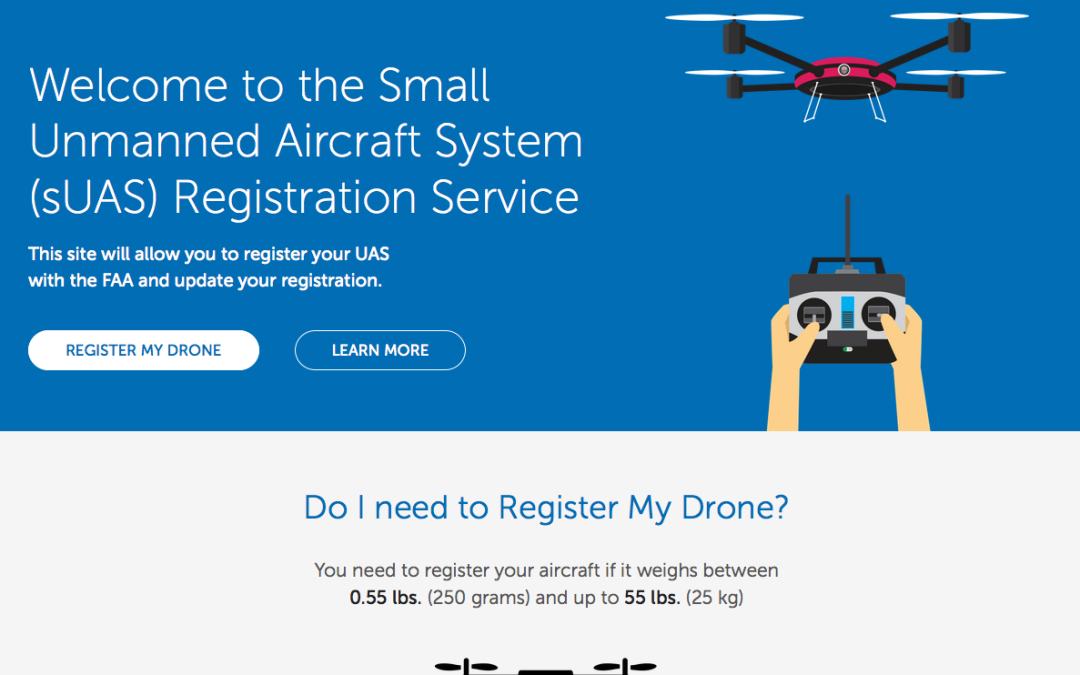
Drones weighing over 0.55 lbs must be registered via the official FAA DroneZone portal to comply with federal law. Whether flying for recreational use or commercial purposes, registration costs $5 and remains valid for three years.
🎯 Key Takeaways
- Takeaway 1:Register only through the official FAA DroneZone website to avoid scams.
- Takeaway 2:Registration is mandatory for drones weighing between 0.55 lbs and 55 lbs.
- Takeaway 3:A $5 fee covers registration for three years for all pilots.
- Takeaway 4:Physically label your drone with your registration number on the exterior.
- Takeaway 5:Carry a digital or physical copy of your certificate during flight.
To register your drone with the FAA, you must use the officialFAA DroneZone website. The process costs $5 per drone (or $5 per fleet for recreational users), and your registration remains valid for three years. If your drone weighs more than 0.55 pounds (250 grams), you are legally required to register it before your first flight. Failure to comply can result in civil penalties reaching $27,500 and potential criminal fines. This guide walks you through the 2024 requirements to ensure your drone is marked and tagged according to federal law.

Registration is not just about a fee; it is the foundation of the Remote ID era. By registering, you link your specific drone hardware to your personal identity. This allows the FAA to maintain a safe airspace and ensures you are accountable for your flight operations. Whether you are flying a DJI Mini for fun or a heavy-duty thermal drone for industrial inspections, the FAA DroneZone is the only portal you should use. Avoid third-party sites that charge “service fees” on top of the federal registration cost, as these are often unnecessary and predatory.


Decoding FAA Regulations: Recreational vs. Part 107 Commercial Rules
Before you open the registration portal, you must decide which legal framework you will fly under. This choice dictates how you register your hardware and what tests you need to pass. The FAA categorizes pilots based on the intent of the flight, not the type of drone being used.
The Recreational Flyer (Section 44809)
If you fly strictly for personal enjoyment, you fall under the Exception for Limited Recreational Operations. This category is for hobbyists who have no intention of using their footage for business, social media monetization, or volunteer work. As a recreational flyer, you only need to register once for a $5 fee, and that single registration number applies to every drone in your fleet. However, you must pass the TRUST (The Recreational UAS Safety Test) before flying, which is a free online safety quiz.


The Commercial Pilot (Part 107)
If you use your drone for any activity that furthers a business, you must register under Part 107. This includes real estate photography, roof inspections, or even posting monetized videos to YouTube. Unlike recreational flyers, Part 107 pilots must register each drone individually at $5 per aircraft. You must also hold a Remote Pilot Certificate, which requires passing an in-person aeronautical knowledge test at an FAA-approved center. Using a “recreational” registration for commercial work is a common mistake that leads to heavy fines.
- Recreational: One $5 registration covers all your drones.
- Commercial: Each drone requires its own $5 registration and unique number.
- Switching: You can fly a Part 107 registered drone recreationally, but you cannot fly a recreational drone for commercial purposes.
FAA Drone Registration Made Easy: Your Essential Action Plan
Navigating the legal landscape of unmanned aircraft systems (UAS) can feel like flying through a fog bank, but getting your drone registered is a non-negotiable first step for any pilot. This guide covers the entire process of registering your drone with the Federal Aviation Administration (FAA) under the correct legal framework. Whether you are a hobbyist flying for fun or a professional pilot launching a commercial venture, following these steps ensures you stay compliant with federal law, avoid hefty fines reaching into the thousands of dollars, and contribute to a safer national airspace. By the end of this walkthrough, you will have a valid registration number and the confidence to take to the skies legally.
Step 1: Determine Your Flying Category
What you need: A clear understanding of your flying intent (recreational vs. commercial) and the weight of your drone in grams.


Instructions: Before you create an account, you must decide if you fall under “Exception for Limited Recreational Operations” or “Part 107.” If you fly purely for enjoyment and never for any business purpose, you are a recreational flyer. However, if you use your drone for real estate photography, inspections, or even monetized YouTube videos, you must register under Part 107. Additionally, check your drone’s weight. If it weighs less than 0.55 pounds (250 grams), such as a DJI Mini series, and you are flying recreationally, you are not legally required to register it. However, any drone over 250g, or any drone used for commercial purposes regardless of weight, must be registered immediately.
Pro Tip: When in doubt, register under Part 107. It covers you for both commercial and recreational flights, whereas a recreational registration does not permit any commercial activity whatsoever.
Step 2: Gather Your Drone Technical Details
What you need: Your drone hardware, a smartphone with the drone’s flight app, and a notepad.
Instructions: You need specific information for each aircraft you own. Locate the manufacturer (e.g., DJI, Autel, Skydio), the specific model name (e.g., Mavic 3 Pro), and the Remote ID serial number. Note that the Remote ID serial number is often different from the aircraft’s standard serial number. You can usually find this in the “About” section of your flight controller’s settings or on a sticker inside the battery compartment. If your drone was manufactured after September 2022, it likely has built-in Remote ID. If it is an older model, you may need the serial number of an external Remote ID broadcast module that you have attached to the craft.
Pro Tip: Take a clear photo of the serial number with your phone. These numbers are often long strings of alphanumeric characters, and it is incredibly easy to mistake a “0” (zero) for an “O” (letter) during the data entry phase.
Step 3: Access the Official FAA DroneZone Portal
What you need: A computer or tablet with internet access and a valid email address.
Instructions: Navigate to the official FAA website at https://faadronezone-access.faa.gov. This is the only official portal for registration. Be extremely wary of third-party “consultant” websites that look like government sites but charge $50 to $100 for registration. The FAA only charges a flat $5 fee. Click on “Create Account” and provide your email address. You will receive a verification email; click the link within that email to verify your identity. Once verified, log back in and select the “Account Type” that matches the decision you made in Step 1: either the “Recreational Flyer Dashboard” or the “Part 107 Dashboard.”
Pro Tip: Use a permanent personal email address rather than a work or school email. Your registration is valid for three years, and you will need to receive renewal reminders to this address in the future.
Step 4: Complete the Registration Profile
What you need: Your physical mailing address and a primary phone number.
Instructions: Once you have selected your dashboard, you will be prompted to fill out your profile. You must provide your full legal name, a physical address (P.O. Boxes are generally not accepted as primary addresses but can be used for mailing), and a contact number. If you are registering under Part 107 as a business, you will enter the business name here. For recreational flyers, you are registering yourself as a “pilot,” and your one registration number will apply to every drone you own. For Part 107 flyers, you must register every single drone individually, providing the make, model, and serial number for each craft in your fleet.
Pro Tip: Ensure your physical address matches the address on your driver’s license or government ID. If you are ever ramp-checked by the FAA or questioned by law enforcement, inconsistencies in your documentation can cause unnecessary delays.
Step 5: Process the Registration Payment
What you need: A valid credit or debit card.
Instructions: After entering your aircraft details, you will be directed to a checkout screen. The FAA charges a $5 registration fee per registration for recreational flyers (covering all drones) or $5 per aircraft for Part 107 flyers. The system uses the Pay.gov portal, which is a secure government payment processor. Enter your card details and billing information. Once the transaction is processed, the system will generate a PDF Registration Certificate. This certificate contains your unique registration number, which typically begins with “FA” followed by a series of numbers and letters. This registration is valid for exactly three years from the date of issuance.
Pro Tip: Do not close the browser immediately after paying. Wait for the confirmation page and download the PDF certificate right then and there. While they do email it, the email can sometimes be caught in aggressive spam filters.
Step 6: Mark Your Drone Correctly
What you need: A label maker, permanent marker, or engraved plate.
Instructions: Federal law requires that your FAA registration number be visible on the exterior surface of the drone. In the past, you could hide the number inside the battery compartment, but this is no longer allowed for safety and security reasons. The number must be legible and durable enough to survive a crash or exposure to weather. Most pilots use a simple label maker with black-on-clear tape to maintain the aesthetic of the drone while remaining compliant. If you have multiple drones as a recreational flyer, you must apply that same registration number to every drone in your collection that weighs over 250g.
Pro Tip: Use a label maker with “industrial strength” adhesive. The heat generated by drone motors and batteries can cause standard office labels to peel off mid-flight, potentially putting you out of compliance.
Step 7: Complete the Mandatory TRUST Test
What you need: 15-30 minutes of undivided attention and an internet connection.
Instructions: If you registered as a recreational flyer, you have one more legal requirement. You must take the The Recreational UAS Safety Test (TRUST). This is a free, online safety training course and exam provided by FAA-approved partners (like Pilot Institute or Embry-Riddle). The test is “open book,” and you cannot fail; if you get a question wrong, the system will allow you to correct it. Once finished, you will receive a TRUST completion certificate. This is a separate document from your drone registration, but you are legally required to have it on your person whenever you are flying your drone.
Pro Tip: Save a digital copy of your TRUST certificate to a cloud folder (like Google Drive or iCloud) and keep a printed, laminated version in your drone carrying case. Unlike the registration, the TRUST certificate never expires.
✅ Final Checklist
- Registration number is clearly visible on the exterior of the drone body.
- A digital or physical copy of the FAA Registration Certificate is in your flight kit.
- The Remote ID serial number entered in DroneZone matches the hardware settings.
- (Recreational Only) The TRUST safety certificate has been printed and stored with the drone.
- The $5 fee has been paid and you have a receipt for your records.
Important Notes:
- Safety First: Registration does not grant you the right to fly anywhere. Always check the B4UFLY app or UAS Facility Maps for local airspace restrictions before taking off.
- Selling Your Drone: If you sell your drone, you must log back into the FAA DroneZone and “un-assign” or delete that aircraft from your profile to release the serial number for the next owner.
- Time and Cost: The entire process takes approximately 20-30 minutes and costs exactly $5.00 per registration/aircraft.
- Legal Warning: Failure to register a drone that requires registration can result in civil penalties of up to $27,500 and criminal fines of up to $250,000 and/or imprisonment for up to three years.
Weight Thresholds and Equipment Requirements for Registration
Not every drone requires registration, but the exemptions are narrow. Understanding the 0.55-pound threshold is critical because it determines your legal liability. If your drone exceeds this weight by even a fraction of an ounce, you are grounded until you have your FAA number.

The 0.55-Pound (250g) Rule
The FAA mandate applies to any drone weighing between 0.55 lbs (250g) and 55 lbs (25kg). This weight includes everything on board at the time of takeoff, such as propellers, batteries, and aftermarket cameras. If you own a “sub-250g” drone like the DJI Mavic Mini or Autel Nano, you do not need to register it for recreational use. However, if you use that same small drone for commercial work under Part 107, you must register it regardless of how light it is.
Remote ID Requirements for 2024
As of 2024, the FAA requires most drones to have Remote ID capabilities. This is essentially a digital license plate that broadcasts your drone’s location and serial number. When you register, the FAA will ask for your drone’s Remote ID Serial Number. This is often different from the manufacturer’s serial number found on the box. Most modern drones have this built-in, but older models may require an external broadcast module. You cannot complete the 2024 registration process without providing this 20-digit alphanumeric code if your drone is required to have it.
- Drones under 250g: No registration needed for hobby use; mandatory for Part 107.
- Drones 250g to 55 lbs: Mandatory registration for all users.
- Remote ID Serial: Required for all new registrations in 2024.
Step-by-Step Guide to the FAA DroneZone Registration
Now that you have identified your pilot category and confirmed your drone’s weight, it is time to access the portal. The FAA DroneZone is the specific tool used for this process. Ensure you have your drone’s serial number and a credit card ready before starting.
Creating Your Official FAA Account
Navigate to the official FAA DroneZone website. Look for the “Create Account” button. You will need to provide a valid email address and create a secure password. The FAA will send a verification email immediately; you must click the link in that email to activate your account. Once logged in, the system will ask you to “Add a Service.” For most users, this means selecting either the Inventory and Registration for Recreational Flyers or the Part 107 Dashboard. Do not rush this step, as selecting the wrong dashboard can complicate your filing and may require you to pay the fee twice to fix it.
Entering Your Drone Hardware Details
After entering your dashboard, click on “Register Device.” The system will prompt you for the “Device Type” (usually “Remote ID Broadcast Module” or “Standard Remote ID Drone”). This is where you enter the 20-digit Remote ID serial number. Pro-tip: Check your drone’s mobile app settings under the “About” or “Safety” menu to find the exact Remote ID serial number. If you enter the wrong serial number, your registration is technically invalid, even if you have paid the fee. You will also be asked for the manufacturer and model name (e.g., Manufacturer: DJI, Model: Air 3).
Cost Analysis and Registration Renewal Timelines
One of the most common questions new pilots ask is: “How much is this going to set me back?” The good news is that FAA registration is one of the most affordable aspects of drone ownership. However, there are some nuances between hobbyist and professional costs that you need to keep in mind to avoid overpaying or falling for third-party scams.
Understanding the Flat Fee Structure
As of 2024, the FAA keeps the pricing simple and transparent. If you are flying for fun (Recreational), you pay a flat fee of $5. This single registration covers your entire fleet of drones, meaning you can fly ten different aircraft under the same registration number. If you are flying under Part 107 (Commercial), the fee is also $5 per drone. Because commercial registration is tied to the specific serial number of the aircraft, you cannot “share” a registration across multiple units.
- The $5 Rule: This is the only official price. If a website asks for $50 or $100, you are likely on a third-party site that charges “service fees” for something you can do yourself in five minutes.
- Payment Method: Ensure you have a valid credit or debit card ready; the FAA DroneZone does not currently accept crypto or digital-only gift cards.
- Commercial Scaling: Professional photographers or roof inspectors should budget $5 for every new addition to their fleet.
Keeping Your Registration Active
Registration isn’t a “one and done” lifetime membership. Your FAA registration is valid for three years from the date of issuance. Many pilots make the mistake of letting their registration lapse, which can lead to significant fines if you are grounded by local law enforcement or an FAA official during a routine check.
A great tip is to set a calendar reminder for 30 days before your expiration date. When you renew, you’ll receive a fresh certificate. If you sell a drone, remember to log back into the portal and de-register that specific serial number to ensure the new owner can register it under their name without a “duplicate serial” error.
Compliance Essentials: Proper External Labeling and Remote ID
Getting your registration number is only the first half of the battle. The FAA requires that your registration number be physically visible on the aircraft. Think of this as a license plate for the sky; if your drone is involved in an incident, authorities need to be able to identify the owner without needing specialized tools to open the chassis.
The Right Way to Label Your Craft
The rules for labeling changed recently. Previously, you could hide the registration number inside the battery compartment. This is no longer allowed. The registration number must be displayed on the exterior surface of the drone. It doesn’t have to be massive, but it must be legible to the naked eye upon close inspection.
- Visibility: Use a high-contrast color. If your drone is grey, use a black or white label.
- Durability: Use a label maker with weather-resistant tape or a fine-tip permanent marker. Avoid using masking tape, which tends to peel off mid-flight due to wind resistance and humidity.
- Placement: The side of the fuselage or the top of the “shell” are the best spots. Avoid placing labels on moving parts like gimbal arms or propellers.
Navigating Remote ID Requirements
In 2024, Remote ID is a non-negotiable part of FAA compliance. Remote ID acts as a “digital license plate” that broadcasts your drone’s location and registration info via radio signals. Most modern drones from major manufacturers have this built-in, but you must ensure it is activated and correctly linked to your registration profile.
If you are flying an older DIY drone or a legacy model that lacks built-in Remote ID, you will likely need to purchase a Remote ID broadcast module. This is a small accessory that mounts to the top of your drone. When registering, the FAA portal will ask for your “Remote ID Serial Number”—be careful not to confuse this with the drone’s standard serial number, as they are often different strings of characters.
Conclusion
Navigating FAA registration might feel like a hurdle, but it is a vital step in protecting the hobby and ensuring the skies remain safe for everyone. By understanding the low cost of entry, staying on top of your three-year renewal cycle, and ensuring your drone is physically labeled and Remote ID compliant, you are setting yourself up for a stress-free flying experience. Compliance isn’t just about following rules; it’s about being a responsible member of the aviation community.
Next Steps: Double-check your drone’s exterior right now—is your number clearly visible? If not, grab a label maker today. Once that’s done, keep a digital copy of your registration certificate on your smartphone for easy access in the field. Safe flying!
❓ Frequently Asked Questions
What is the difference between Section 44809 and Part 107 registration?
Section 44809 is strictly for hobbyists flying for fun, while Part 107 is required for any flight intended for business or compensation. Each requires a distinct registration path within the FAA DroneZone.
What happens if I fly an unregistered drone?
Flying an unregistered drone can result in significant civil and criminal penalties, including fines up to $27,500. It is essential to register before your first flight to stay compliant with federal law.
Do I need a separate registration for every drone I own?
Recreational flyers pay $5 to register themselves and can apply that one number to all their drones. Commercial (Part 107) pilots must register each individual drone for $5 each.
What information do I need to provide during registration?
You will need your physical address, an email address, the make and model of your drone, and a valid credit or debit card. You may also need your drone’s Remote ID serial number if applicable.
Is the TRUST test required alongside registration?
Yes, all recreational flyers must pass The Recreational UAS Safety Test (TRUST) and carry proof of passage while flying. This is a separate legal requirement from the drone registration itself.
Can I register my drone if I am not a US citizen?
Non-citizens can register their drones, but the FAA issues a ‘Recognition of Ownership’ rather than a standard certificate of registration. This still serves as legal authorization to fly in US airspace.

Similar Posts