Best Drone Analytics for Construction: Top Platforms 2024
Commercial UAV Pilot & Aerial Cinematography Specialist at Drone Nestle · FAA Part 107 Remote Pilot Certification, Commercial UAS Operations · 10+ Years in Commercial UAV Operations, Flight Hardware Benchmarking & 4K Aerial Cinematography
The best drone analytics for construction are currently provided by DroneDeploy, Propeller, and SiteScan due to their superior BIM integration and survey-grade accuracy. These platforms enable project managers to track progress using automated volumetric measurements and high-resolution 3D point clouds that sync with industry-standard software.
🎯 Key Takeaways
- DroneDeploy leads in ease of use and seamless integration with Procore and Autodesk.
- Propeller is the industry standard for high-accuracy earthworks and survey-grade volumetric reporting.
- Autodesk SiteScan offers the most native workflow for users heavily invested in the Revit ecosystem.
- BIM-to-field overlays are essential for identifying structural deviations before they become costly errors.
- Cloud-based processing is preferred over local processing for faster stakeholder data sharing.
Choosing the right drone analytics platform for your construction site comes down to three industry leaders: DroneDeploy for seamless enterprise integration, Propeller for precision earthworks and volumetrics, and Pix4D for granular photogrammetric control. While several niche players exist, these three dominate because they bridge the gap between raw aerial imagery and actionable survey-grade data that project managers actually trust for decision-making.

Getting this choice right directly impacts your ROI by reducing rework and tightening your project schedule. You are not just looking for high-resolution photos; you need a platform that syncs with your BIM models and provides centimeter-level accuracy to verify progress against design. The following breakdown focuses on how these platforms perform under the pressure of active, high-stakes jobsites where data integrity is non-negotiable.
Comparison of Top-Tier Drone Analytics Platforms for Construction
DroneDeploy: The Leader in Automation and Integration
DroneDeploy is the primary choice for firms looking for an “all-in-one” ecosystem. Its strength lies in its ability to scale across multiple jobsites with minimal training for field personnel. If your team uses Procore, Autodesk Build, or Bluebeam, DroneDeploy offers the most robust native integrations. You can sync drone maps directly to your project management dashboard, allowing stakeholders to view reality capture data alongside project documents without switching tabs.

The platform’s “Walkthrough” feature is a standout for vertical construction. It allows you to combine aerial data with 360-degree ground-level imagery. This creates a comprehensive digital twin of both the exterior and interior of the structure. For a project manager, this means verifying MEP (mechanical, electrical, plumbing) installations against the BIM model before the drywall goes up, significantly reducing the risk of hidden errors.
Propeller: The Choice for Heavy Civil and Earthworks
When your primary KPI is moving dirt, Propeller is the superior option. Unlike purely automated software, Propeller utilizes a “Human-in-the-Loop” data processing model. Their team of photogrammetrists verifies your data, ensuring that stockpile volumes and cut/fill maps are consistently accurate. Their proprietary AeroPoints (smart ground control points) are the gold standard for achieving sub-centimeter accuracy without requiring a traditional survey crew on site for every flight.
- DroneDeploy: Best for vertical construction, progress reporting, and multi-site enterprise management.
- Propeller: Best for massive earthmoving projects where volumetric accuracy and contractor accountability are the highest priorities.
- Pix4D: Best for internal VDC (Virtual Design and Construction) teams who want total control over the photogrammetric processing engine and local data hosting.
Pix4D: Precision for Power Users
Pix4Dcloud and Pix4Dmatic are designed for users who need deep technical control. While it has a steeper learning curve than DroneDeploy, it provides unparalleled flexibility in how data is processed. It is particularly favored by firms that have in-house surveying departments. Pix4D allows you to customize processing parameters to account for difficult terrain or specific lighting conditions, ensuring the resulting point cloud is as clean as possible before it enters your CAD environment.
Critical Analytics Features: Volumetrics, Point Clouds, and BIM Overlays
Mastering Volumetrics and Earthwork Progress
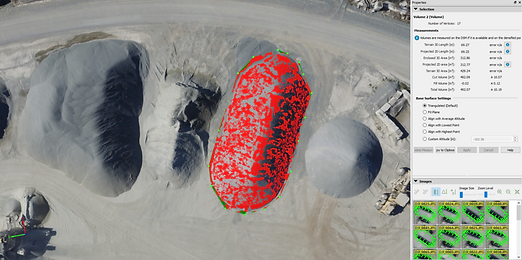
The most immediate ROI in drone analytics comes from automated volumetric measurements. Instead of waiting weeks for a manual survey or relying on estimated truck counts, you can calculate stockpile volumes in minutes. Propeller and DroneDeploy both allow you to compare current site conditions against a previous flight or the final design grade (CAD/BIM files). This allows you to see exactly how many cubic yards of material remain to be moved.
Practical application: On a recent 50-acre highway project, a contractor used Propeller to identify a 5,000-cubic-yard discrepancy in a subcontractor’s billing. By showing the digital “cut/fill” map, they reconciled the invoice in hours rather than weeks of litigation. This level of transparency is only possible when your analytics platform supports high-frequency data uploads and rapid processing.
BIM Overlays and Reality vs. Design
Accuracy is meaningless if you cannot compare it to your project plans. Top-tier platforms allow you to upload your BIM models (IFC, NWD, or DXF files) directly onto the drone map. This creates a “Plan vs. Actual” overlay that exposes deviations in real-time. You can spot a foundation wall that is six inches out of alignment or a utility trench dug in the wrong spot before the concrete is poured.
The integration with Autodesk Revit and Navisworks is what separates high-end analytics from basic mapping tools. By exporting high-density point clouds from the drone software into your BIM environment, your VDC team can perform “clash detection” between the as-built reality and the digital design. This ensures that the digital twin you are building matches the physical structure on the ground, centimeter for centimeter.
- Cross-Section Analysis: Compare the elevation of your drone data against the design grade at any point on the site.
- Point Cloud Export: Seamlessly move LAS or E57 files into Civil 3D or Revit for detailed engineering work.
- Timeline Sliders: Use a side-by-side visual comparison to track weekly progress against the master schedule.
Ecosystem Synergy: Integrating Drone Data with Procore and Autodesk Build
In modern construction, data is only as valuable as its accessibility. The best drone analytics platforms don’t exist in a vacuum; they act as a digital bridge between the high-altitude jobsite and the project trailer. When your drone maps automatically sync with industry-standard project management tools like Procore or Autodesk Build, you eliminate the friction of manual uploads and fragmented communication.

Breaking Down Data Silos
By integrating drone overlays directly into your existing dashboard, site managers can view high-resolution orthomosaics alongside their project schedules and budgets. This means that when a sub-contractor asks about specific site conditions, you aren’t digging through emails for a static PDF. Instead, you are looking at a live, georeferenced map that provides a single source of truth for the entire team, accessible from any mobile device on-site.
Automated Progress Tracking and BIM Comparison
The real power of ecosystem synergy is realized when you overlay your BIM (Building Information Modeling) files onto your drone-captured reality. Leading platforms allow you to compare “as-built” conditions against “as-designed” plans in a single view.
- Identify Deviations Early: Spot a foundation wall that is slightly out of alignment before the concrete cures, saving thousands in potential rework.
- Streamline RFIs: Attach a direct link of a 3D drone model to a Procore RFI to provide visual context that words simply cannot capture.
- Enhanced Verification: Provide owners with indisputable visual proof of work completed to trigger faster payment cycles and build trust.
Practical Tip: Always check if your chosen analytics provider offers “two-way” integration. This allows data to flow both into your management software and back into the drone platform for consistent naming conventions across the project.
Data Accuracy Standards: Evaluating RTK vs. Ground Control Points
Analytics are worthless if the underlying data is skewed. In construction, where an inch can mean the difference between a perfect fit and a costly mistake, understanding the difference between RTK drones and traditional Ground Control Points (GCPs) is vital for choosing the right analytics service.
The Precision Debate: RTK vs. GCPs
RTK (Real-Time Kinematic) drones utilize a GPS base station or a network of towers to provide real-time corrections to the drone’s position. This technology offers survey-grade accuracy without the need to manually lay out dozens of targets across a dangerous jobsite. However, many veteran surveyors still rely on Ground Control Points (GCPs)—physical markers on the ground with known coordinates—to “anchor” the drone data to the earth’s surface with absolute certainty.
Choosing the Right Setup for Your Site
Your choice often depends on the project’s scale, the terrain, and the required tolerances. For massive earthmoving projects, RTK is a game-changer because it drastically reduces the time spent walking the site to set points. For high-rise structural work or projects in “canyons” of existing buildings, a hybrid approach is often the gold standard.
- Use RTK for: Rapid topographic maps, volumetric measurements of stockpiles, and daily progress snapshots where speed is a priority.
- Use GCPs for: Legal boundary surveys, high-tolerance structural alignments, and projects located in areas with poor cellular or satellite coverage.
- The Hybrid Strategy: Use an RTK-enabled drone for primary data collection, but place 2-3 GCPs as “checkpoints” to verify the accuracy of the entire map in your analytics software.
Real-World Example: A large-scale site prep contractor recently saved over 40 hours of labor per month by switching to an RTK-enabled workflow, while maintaining a vertical accuracy of less than 3 centimeters across 500 acres.
Conclusion: Scaling Your Drone Operations
Choosing the best drone analytics for construction isn’t just about finding the flashiest features; it’s about finding the tool that fits your current workflow and software stack. Whether you prioritize the deep BIM integration of Autodesk, the user-friendly interface of DroneDeploy, or the high-precision earthworks focus of Propeller, the goal remains the same: better visibility and reduced risk.
To move forward, evaluate your current pain points. Are you struggling with manual volume calculations, or is project communication your biggest hurdle? Reach out to these providers for a demo using your own site data, and ensure your hardware is capable of meeting the accuracy standards your projects demand. Ready to transform your jobsite? The sky is no longer the limit—it’s your greatest asset for building smarter and faster.
❓ Frequently Asked Questions
How does drone analytics improve construction ROI?
Drone analytics reduce rework by detecting deviations from BIM designs early and automate stockpile measurements. This significantly lowers manual surveying costs and speeds up the verification of subcontractor work.
What is the difference between RTK and GCPs for construction accuracy?
RTK drones provide real-time location corrections during flight, whereas Ground Control Points (GCPs) are physical markers used for post-flight calibration. Most top-tier platforms use a combination of both to ensure sub-centimeter accuracy for site measurements.
Can drone analytics detect structural errors automatically?
By overlaying ‘as-built’ drone maps onto original CAD or BIM models, these platforms highlight discrepancies in foundation or utility placement. This allows site managers to catch mistakes before they are covered by concrete or additional structures.
How long does it take to process construction drone data?
Cloud-based platforms typically return processed 2D maps and 3D models within 4 to 24 hours. This turnaround time is critical for daily or weekly progress tracking and stakeholder reporting.
What BIM file formats are compatible with drone analytics tools?
Standard compatible formats include .DXF, .SHP, .IFC, and .NWD. This ensures that drone-captured point clouds can be directly compared against the architectural and engineering models used by the design team.
Are there drone analytics options for smaller contractors?
Yes, many providers offer tiered pricing or pay-per-project models for smaller firms. While enterprise features like full BIM-to-field comparison may cost more, basic volumetric and progress tracking tools are becoming increasingly accessible.

Similar Posts